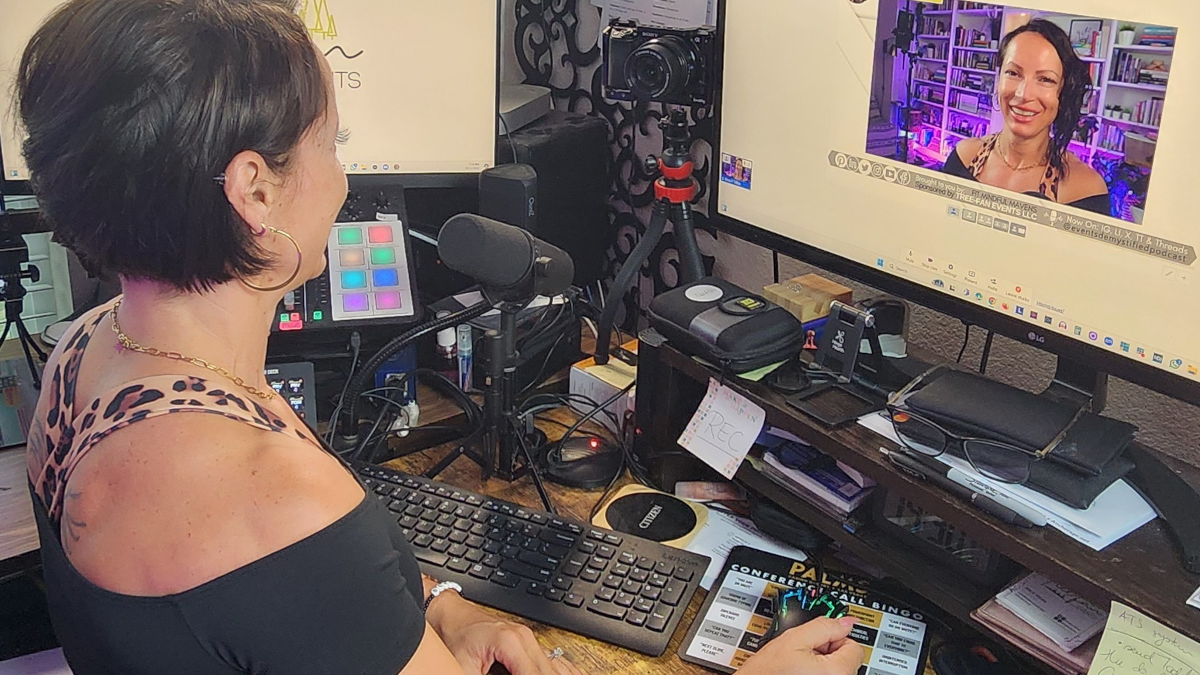
Anca Platon Trifan of Tree-Fan Events and the host of the Events Demystified Podcast shares her ideal setup and how she records for her podcast – at home and onsite.
Podcasting is something that’s close to my heart and I’ve been recording for a quite a while now. I’ve learned a thing or two about the ins and outs of remote (at-home) versus on-site podcast recordings. Let me share my experiences and maybe help you figure out which route might be best for you.
My Home Studio Setup
Recording from home has been a game-changer for me. It’s comfortable, convenient, and with the right gear, you can produce some really professional-sounding content. Here’s what my setup looks like:
- Computer and Tech: I use a desktop computer equipped with an RTX 3070 graphics card. It handles all the processing I need without breaking a sweat. A wired internet connection keeps things smooth during live sessions—no one likes laggy video or dropped calls!
- Audio Gear: My Shure SM7B mic is my pride and joy. Paired with a Cloudlifter and connected to my Rodecaster Pro mixer, it captures my voice just the way I like it. Crisp and clear.
- Visuals: For video recordings, I rely on a Sony Alpha camera. It gives that nice, professional look that sets your content apart.
- Recording Platform: I swear by StreamYard. It’s user-friendly, and I’ve got all my branding set up there—intros, outros, ads, you name it. Following my script and flow feels like second nature now, and it’s super predictable and repeatable.
Bringing Guests On Board
Guests add so much value to a podcast, and I’ve streamlined the process of getting them involved:
- Booking Guests: Whether I personally invite someone or choose from the many folks eager to be featured, I send them a Calendly invite. Depending on whether they’re showcasing their expertise for free or opting for a pay-to-play spot, the invite adjusts accordingly.
- Intake Form: Along with the invite, there’s an intake form where they can share their bio, headshot, logo, topics they’re interested in, fun facts, and even questions they’d like me to ask them.
- Automated Script Generation: All that info feeds into a spreadsheet, and with a bit of tech magic (thanks to our own private custom GPT model), an automated highly personalized script is generated. It includes:
- Intro and Bio: So I can introduce them properly.
- Ice-Breakers: To kick things off on a fun note.
- Mid-Roll Ads: If applicable.
- Custom Questions: Based on their expertise and interests.
- Intro and Bio: So I can introduce them properly.
- Flexibility: I share the questions with guests if they want them. Some prefer to prepare; others like to keep it spontaneous. Either way, the script serves as a guideline to keep the conversation flowing naturally, without feeling scripted.
- Preparation and Reminders: A week before recording, we send out the recording link and a friendly reminder about our no-show fee of $100. In five years and over 200 guests, only one person has missed their slot!
Content Creation and Scheduling
- Batch Recording: I like to record at least five episodes before launching a new season. Whether it’s a weekly or bi-monthly release schedule, this approach keeps things organized and stress-free.
- Asset Creation: My podcast team is fantastic. They create all the guest assets ahead of time—intro banners, overlays, social media graphics—so everything’s ready to go by recording day.
Editing Made Easy with Descript
Post-production used to be a massive time sink for me. Hours upon hours spent tweaking audio and video. But then I discovered Descript, and it changed the game:
- Efficient Editing: Descript uses AI to remove filler words like “um” and “uh,” which cleans up the audio nicely.
- Captions and Clips: It generates captions for videos and creates short clips perfect for sharing on social media.
- Content Generation: The software even helps draft YouTube descriptions and blog posts based on the transcript.
Because my recording environment is pretty ideal, I don’t have to fuss over audio quality too much. Accepting that my minimum viable product is still better than most out there has freed up so much time. Now, I can focus on scheduling more guests and getting more content out there instead of being bogged down in post-production.
On the Road: On-Site Recordings
Now, let’s talk about on-site recordings. These are a different beast but offer their own set of rewards. When we produce podcasts for clients or take our show on the road to trade shows and conferences, here’s what we do:
- Equipment Setup:
- Cameras: We use three Sony Alpha or Blackmagic cameras to capture multiple angles, plus a GoPro for behind-the-scenes B-roll footage.
- Audio:
- Rode NTG4 Shotgun Mics: Great for capturing clear audio in a live setting.
- Rode Wireless GO Systems: Perfect for close-up audio without the hassle of cables.
- Rode NTG4 Shotgun Mics: Great for capturing clear audio in a live setting.
- Lighting: A 3-way lighting setup ensures everything looks professional.
- Prompter Options: We can set up a teleprompter if the talent prefers, or just have a laptop nearby with key topics.
- Cameras: We use three Sony Alpha or Blackmagic cameras to capture multiple angles, plus a GoPro for behind-the-scenes B-roll footage.
- Location Scouting: Before we even unpack the gear, we scope out the location. We look for spots that are visually appealing, quiet, and have good natural light.
- Editing Process:
- Final Cut Pro: We use the MultiCam feature to switch between angles seamlessly and add lower thirds for names and titles.
- Descript: After the initial edit, we run everything through Descript for final touches—removing filler words, adding captions, and generating descriptions.
- Final Cut Pro: We use the MultiCam feature to switch between angles seamlessly and add lower thirds for names and titles.
On-site recordings take more time and resources, no doubt about it. But there’s something special about face-to-face conversations. The energy is different, and guests often feel more engaged. It’s an investment, but for some, the value is absolutely there.
Deciding What’s Right for You
If you’re new to podcasting, choosing between remote and on-site recording might come down to budget and what you value most. Remote recording is cost-effective and convenient, especially if your guests are spread out geographically. On-site recording can elevate the production value and create a more engaging experience but requires more investment.